MCP
MCP stands for Model Context Protocol.
Think of MCP like a USB-C port for AI applications.
Just as USB-C provides a standard interface for connecting devices like keyboards, monitors, and storage to any compatible computer, MCP provides a standard protocol for connecting AI applications to external tools and data sources.
By default, an LLM like ChatGPT or Claude can't create a Jira ticket. This is where Jira MCP comes into picture. You connect Jira MCP with your LLM and now it has permissions and knowledge to create Jira tickets.
How the pieces fit:
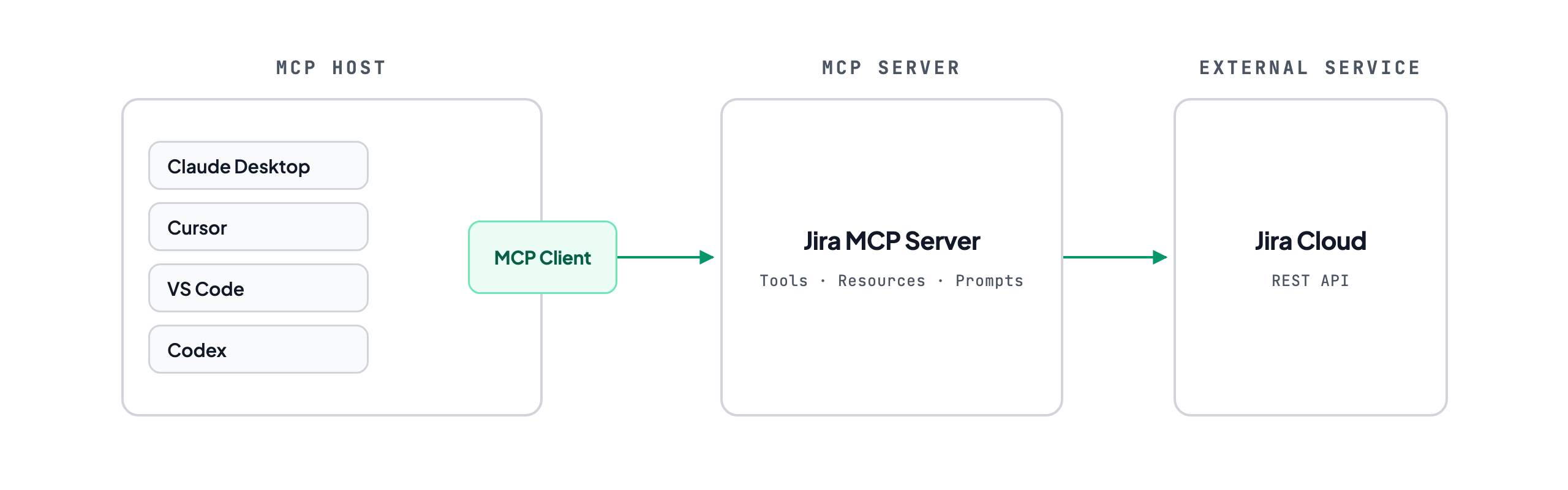
MCP host can be apps like Claude Desktop, Codex app or IDE like VS Code, Cursor
MCP client is part of MCP host, which initiates the connections. It can be configured at
| Tool | Project scope | Global scope |
|---|---|---|
| Claude Code | .mcp.json (repo root) |
~/.claude.json |
| Claude Desktop | not supported | ~/Library/Application Support/Claude/claude_desktop_config.json (macOS)%APPDATA%\Claude\claude_desktop_config.json (Windows) |
| Cursor | .cursor/mcp.json |
~/.cursor/mcp.json |
| VS Code | .vscode/mcp.json |
user profile, via MCP: Open User Configuration |
| Codex | .codex/config.toml (trusted projects only) |
~/.codex/config.toml |
MCP server can be JIRA MCP built by Atlassian or built by you. It contain bunch of code which can talk with external service.
External Service can be the system MCP server connects to. Jira, GitHub, Slack, etc
MCP Client Configuration
Two shapes:
1. Local server (stdio) - used when the MCP server runs on your own computer
{
  "mcpServers": {
    "jira": {
      "command": "npx",
      "args": ["-y", "@some/jira-mcp-server"],
      "env": { "JIRA_API_TOKEN": "..." }
    }
  }
}
command is the executable to run,
args are the arguments passed to it, and
env sets environment variables for the server process.
2. Remote server (HTTP/SSE) - already running somewhere, the host just connects:
SSE (LEGACY)
{
  "mcpServers": {
    "jira": {
      "type": "sse",
      "url": "https://mcp.atlassian.com/v1/sse"
    }
  }
}
Streamable HTTP
{
  "mcpServers": {
    "jira": {
      "type": "http",
      "url": "https://mcp.atlassian.com/v1/mcp"
    }
  }
}
mcpServers is root key, it depends on your MCP Host.
- Claude Code, Claude Desktop, Cursor - mcpServers
- VS Code - servers
- Codex - [mcp_servers.<name>] in TOML
jira is MCP server name
url: remote MCP server URL
type: transport type, like stdio, sse, http
MCP Server Capabilities
There are 3 main capabilities:
1- Tools
2- Resources
3- Prompts
1. Tools:
Actions the MCP server can take.
Example:
Tool name:
send_emailUser Query to AI:
send I am gonna be late email to my managerThe user never named the tool. The model read the request, saw send_email in the available tool list, and chose it.
2.Resources:
Resources are things MCP server can read or show. A resource is like a file, document, log, or database record.
Example:
Resource name:
hr://employees/recordsUser query to AI:
Show me newly joined employees from 20 July to 27 July 20263.Prompts:
Saved workflows the user picks by name.
Example:
Prompt name:
create_error_reportPrompt Instructions:
1. Read the error
2. Explain what happened
3. Find the possible reason
4. Suggest a fix
5. Create a short report
User Query to AI:
/create_error_reportReference
- https://modelcontextprotocol.io/
- https://cloud.google.com/discover/what-is-model-context-protocol
- https://www.anthropic.com/news/model-context-protocol